



A slow or weak WiFi connection can be more frustrating than anything, especially when you’re working, streaming, or even watching your favorite show. In today’s digital age, a strong WiFi connection has become a basic need in every home and office. Yet, it’s common to face weak signals in certain corners of your house or workspace. So, how do you fix that? Let’s explore some smart and practical ways on how to extend the WiFi signal and enjoy smooth connectivity everywhere.
Understanding Why Your WiFi Signal Is Weak
Before you try to extend WiFi range, it’s important to understand what’s actually reducing the signal strength. WiFi signals are radio waves, and like any signal, they weaken when they pass through thick walls, metal objects, or large furniture. Even household appliances such as microwaves and cordless phones can interfere with the signal.
Sometimes, the problem lies in the router itself. Older routers or outdated models may not cover larger spaces effectively. Upgrading to a modern router that supports dual-band or mesh systems can instantly improve coverage.
Distance is another key factor. The further your device is from the router, the weaker the signal becomes. So, learning how to extend WiFi reach can make a noticeable difference in every room.
Best Methods to Extend Your WiFi Signal
There are several effective ways to extend WiFi in your home or office. The best method depends on your space, budget, and the devices you use. Let’s go through the most reliable options.
1. Use a WiFi Extender or Repeater
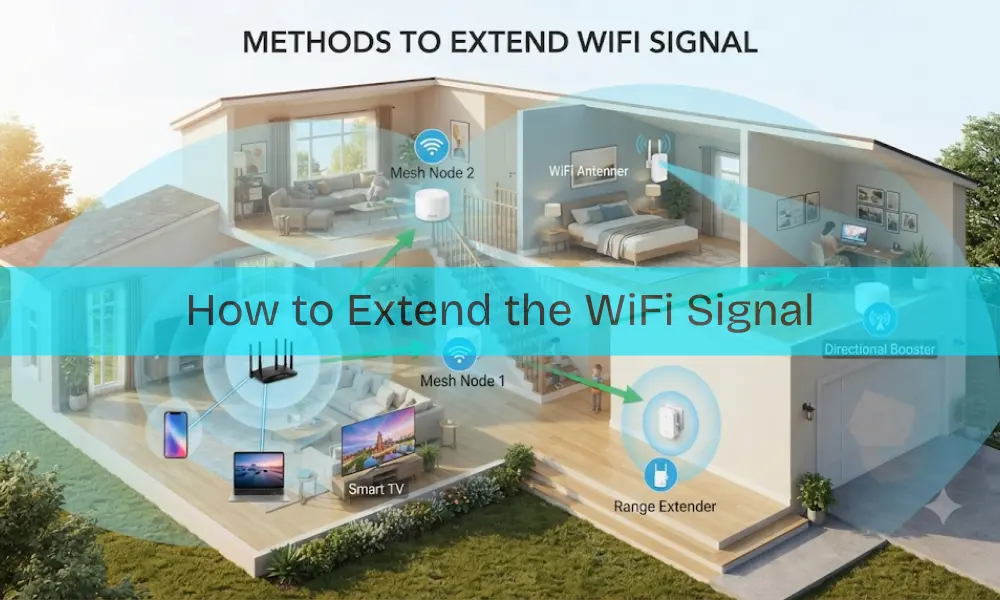
A WiFi extender, also known as a repeater, is one of the easiest tools to improve wireless coverage. It works by receiving your existing WiFi signal and rebroadcasting it to areas with weak coverage.
For example, if your router is placed in the living room, and the signal doesn’t reach the upstairs bedroom, installing a WiFi extender halfway between these areas can help. It’s simple, affordable, and doesn’t require much technical knowledge.
However, be mindful of where you place it. The extender should be within range of your router’s signal, not too far, not too close. Place it in an open space for the best performance.
2. Set Up a Mesh WiFi System
If you have a large home, multiple floors, or several thick walls, a mesh WiFi system might be the perfect solution. Unlike traditional extenders that create separate networks, mesh systems work as one unified network with multiple nodes.
This means you can move around your home without disconnecting from one network to another. The best part? You get consistent coverage and speed in every corner. If you’re wondering how do I extend WiFi range without affecting speed, mesh WiFi is your answer.
3. Use an Additional Router or Access Point
If you have an old router lying around, you can convert it into an access point. Connect it to your main router using an Ethernet cable, and it will serve as a new WiFi source. This setup provides a strong, stable connection — especially for larger homes or offices where wireless extenders might not be enough.
It may require a bit of configuration, but once set up, it’s one of the most reliable ways to extend WiFi range without losing speed or quality.
4. Try a Powerline Adapter
A powerline adapter is a clever way to extend WiFi using your home’s electrical wiring. It consists of two units — one connects to your router, and the other plugs into a socket where you want better WiFi coverage. This setup delivers both wired and wireless signals without running long cables through walls.
It’s an ideal choice if your router and the weak-signal area are on different floors.
Tips to Boost and Optimize WiFi Performance
Even after you extend WiFi range, you might still face occasional drops or speed issues. To keep your network running smoothly, here are a few extra steps on how to boost WiFi performance effectively.
- Place Your Router Smartly: Keep your router in a central, open location rather than hidden in a cabinet or corner.
- Avoid Interference: Move your router away from microwaves, TVs, and metal surfaces that block signals.
- Update Firmware Regularly: Make sure your router and extenders have the latest firmware to maintain performance and security.
- Upgrade Old Hardware: Older routers or extenders may not support modern speeds. Newer dual-band and tri-band routers offer far better coverage.
- Limit Connected Devices: Too many devices connected at once can slow down the entire network.
Learning how can you boost WiFi signal is all about optimizing what you already have before spending more on new hardware.
Step-by-Step: Setting Up a WiFi Extender
Setting up a WiFi extender isn’t complicated. Here’s a quick guide to get it done right:
- Plug in the Extender: Power it on near your router.
- Use the WPS Button: Press the WPS button on your router, then on the extender. They’ll automatically connect in a few seconds.
- Relocate the Extender: Once paired, move it to a midpoint between your router and the dead zone.
- Check the Signal Strength: Use your phone or laptop to test the signal and ensure it’s improved.
If your devices don’t support WPS, you can also connect manually through the extender’s setup page by selecting your home WiFi and entering the password.
After setup, always perform a quick speed test in the previously weak areas. This helps confirm that your WiFi range extend setup is working correctly.
Troubleshooting Common WiFi Issues
Even with everything in place, WiFi problems can still appear. Here’s how to fix common ones:
- Extender disconnects often: Check for interference from nearby devices or reposition it closer to the router.
- Slow speeds: Update your router firmware or reduce the number of connected devices.
- No connection after setup: Reset the extender and reconnect manually using the setup page.
If you’ve tried everything and the issue remains, it might be time to consider replacing your router or upgrading to a mesh system for more reliable coverage.
When to Upgrade Your Network
Sometimes, the best way to extend WiFi range is to start fresh. If your router is more than five years old, it may not support newer WiFi standards that deliver faster speeds and wider coverage.
Upgrading to a newer model can instantly improve your entire network performance. You can also consult a computer repairs or mobile phone repair technician for professional guidance if you’re not confident with network setups. Many local service providers even offer WiFi setup assistance to help optimize your home or office connectivity.
Final Thoughts
A weak WiFi signal doesn’t have to slow you down. By using the right tools, from extenders and access points to mesh systems, you can extend WiFi range and enjoy strong, seamless connectivity across your home or office. Remember, the key to better performance lies not just in new devices but also in smart placement, regular updates, and eliminating interference.
So, if you’ve been asking yourself how do I boost WiFi signal or how to extend WiFi reach, start with these easy fixes today. With the right setup, you can say goodbye to buffering and dead zones for good.